
Upgrade to version 5.0
For €169 net
Model Creator including implant module becomes PRINT
Milling models become MILLING
Tray generator becomes TRAYS
Bite template including support pin registration becomes LOCATE
MAJOR UPDATE 2023
After several months of development, we at PROMADENT are pleased to present our first major update of 2023. In addition to numerous technical improvements, the BiSS brand identity has been completely redesigned, both in terms of typography and layout. New application names and fresh logos with matching colors and a modern look ensure greater clarity and pave the way for international expansion. The 14 language packs are already available for download, with more to follow. Our goal is to raise awareness of the BiSS software within the dental industry and to introduce entirely new applications.
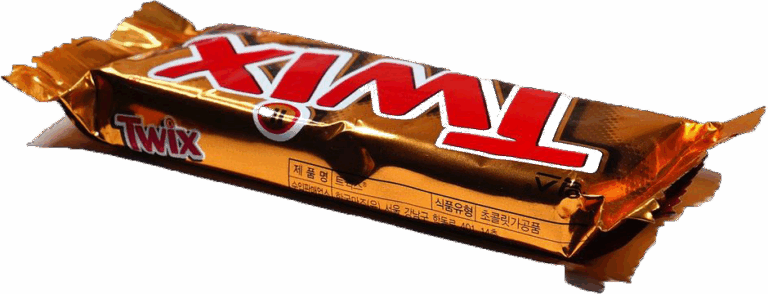
In 1991, the popular German chocolate bar was renamed. Whether the company now known as MARS GmbH used international language jargon as motivation to launch Twix is irrelevant to us as a promoter. Following the lead of the “big players” (e.g., Microsoft Office), our headquarters decided to give our software products a facelift. Furthermore, new structures are being added to the application matrix, and we are now focusing on international markets. And this is what the new roof of our popular software company will look like:
The BiSS success story
Since our founding in 2018, we, as an agile start-up, have impressed with our innovative BISS Model-Creator software for creating models based on intraoral scan data. Since then, our success story has continued to unfold. When the software was first successfully deployed, the logo was still a novelty, but we, the team behind it, were already dreaming big. “One day we’ll have a software offering like Adobe’s Creative Suite,” recalls Hindrik Dehnbostel , CEO of CADSPEED and a member of the founding development team. That dream became reality: In January 2019, we launched the first release candidate (pre-release version) of BISS Dental Model-Creator. A good three years later – thanks in part to the fantastic feedback from enthusiastic users – we’ve created a tool that many dental labs wouldn’t want to be without in their daily work. “Without the BiSS software, we would be lost with our 16 CAD workstations,” reports Ricardo Bell (CEO, CADSPEED milling center).
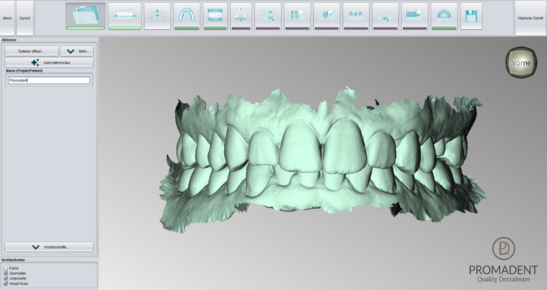
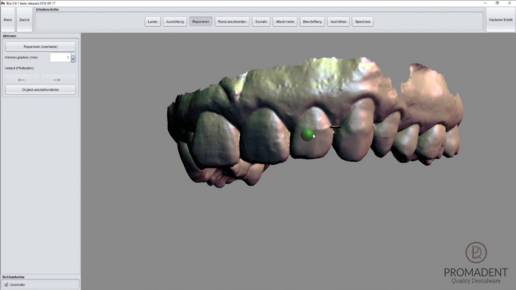
BiSS receives a new turbo boost in its source code and becomes up to 30% faster.
Due to new developments and future applications, the software for designing models based on intraoral scans was reprogrammed during months of maintenance. Calculations that were previously performed sequentially can now be performed in parallel using a multitasking approach. This gives the new PRINT software a performance boost of 30%. This new technology for calculating design steps will be used in other applications as well.
next steps
“We made significant progress during the lockdown and will be launching three new applications in the coming months. We also want to expand internationally, so we needed English terminology for some German-language programs, such as milling models and bite templates. We renamed everything and designed the overarching structure. The BiSS Dental Software Suite brand will unite all applications under one umbrella. Model Creator is now PRINT, milling models are now called MILLING, Tray Generator is now simply TRAYS, and bite templates, including support pin registrations, have been merged into LOCATE.”
Kimberly Krüger, Managing Director at Promadent
An overview of the new designs
PRINT is the software for digital dental model fabrication. Precise, printable 3D models can be created quickly and easily from digital impressions. The scan data is transformed into a virtual dental model using an intuitive step-by-step workflow. With PRINT, removable dies or even complete segments can be defined within the model. After purchasing the MILLING module, you can create a milling model from the previously defined dies in no time. The integrated "Implants" plugin allows you to quickly and easily integrate analogs into your model and create removable gingival masks. An extensive implant library is available for this purpose. Automatic cavity preparation and the creation of drainage channels are essential features for saving material and, consequently, money. Labels for the jaws can be easily applied to the various base geometries, simplifying patient identification. Your progress can be saved and archived at any time in a compressed folder.
The new way to create milling models is digital. With BiSS MILLING! Milling models can be designed in just a few minutes from intraoral and extraoral scan data imported in .STL, .OBJ, and .PLY formats. The step-by-step guidance, already proven in PRINT, is also a welcome convenience in MILLING. This ensures you'll quickly find your way around the program. The digital dental lab thus goes through only a few, but clearly defined, steps, such as defining the abutments, base geometry, and setting the height and spacing. The settings are saved for the next job, allowing for program customization.
Creating custom impression trays? Nothing could be easier with BiSS TRAYS! Developed in collaboration with dental technicians and dentists, TRAYS focuses on the essential steps relevant to impression tray design. With the LOCATE module, this is even possible for bite templates and support pin registrations. The result is a streamlined and efficient workflow that guides you step-by-step to the finished product with numerous automated features. However, the many optionally adjustable parameters ensure maximum flexibility, allowing even the most specific customer requirements to be met. Custom trays can be designed in just a few minutes from intraoral and extraoral scan data imported in .STL, .OBJ, and .PLY formats. The digital dental lab thus goes through only a few, but clearly defined, steps, such as defining the tray shape, blocking out undercuts, creating wax rims if necessary, positioning the tray handle, labeling, and perforating. The settings made are saved for the next order and ensure customization of the program.
Creating custom bite templates and pin registrations is incredibly easy with BiSS LOCATE. Open file formats such as STL, PLY, and OBJ can be imported into LOCATE from a wide variety of intraoral scanners. Developed in collaboration with dental technicians and dentists, the module focuses on the essential steps for constructing bite templates and pin registrations. The workflow includes a repair assistant that cleans up fragments of the digital impression to ensure the flawless design and printing of the bite template and pin registration. You can customize your wax rims with grooves, channels, a rounded end, or an open end. The integrated "Pointer" plugin allows you to flexibly, quickly, and individually combine a hole and a plate for the pin with your predefined base. The result is a well-designed and streamlined workflow that guides you step by step to the finished bite template and the completed support pin registration. BiSS LOCATE relies on numerous automated processes to get you to your goal as quickly as possible.
The BiSS VIEWER supports open file formats such as STL, PLY, and OBJ (color scans are also supported). It now features intuitive operation and customizable visual properties. Change the look and feel, colors of the models, and backgrounds to suit your taste, for example, for presentation purposes. It offers sophisticated display options like the Dual Compare View and an Explode View. You can view the size of each loaded object in single- and multi-boundary boxes, as well as individual geometry data. A feature we've missed in other STL viewers is the ability to move objects within 3D space. Now we can! =) Here's a real highlight, a rare find among 3D viewers: Wall thicknesses can be easily checked with a color-coded display. We love this feature. We hope you will too. 🙂

3 New Software Products
The next revolution from the software workshop will be labeled iAW, which stands for Integrated Auto-Assistant Workflow – that much has been revealed. We’re keeping quiet about what this term really means and what the three upcoming new software applications are all about. Since there seems to have been little activity in recent months, the dental world can look forward to what’s next.
Address
Im Nordfeld 13, 29336 Nienhagen, Germany
Copyright © 2026 Promadent